
Facial Recognition App
| Year | 2014 |
| Project Description | This project, created as an image processing class project,
focuses on implementing a facial recognition system in order to learn about facial recognition algorithms and to test
how effective they are. The algorithm that was chosen for study is the Principal Component
Analysis (PCA) using eigenfaces method. This method is one of the earliest solutions available and was
developed by Turk et al. The reason this method was chosen over some other algorithms is because it
is fast, easier relative to other facial recognition techniques, and fairly accurate. From the results obtained in the experiment phase it can be determined that PCA has a fairly high recognition rate in real world environments (75%) as long as the background and environmental factors are consistent. Recognition rates fall down to 0% when the environment has been changed by dimming the light or changing the background. This leads to the conclusion that PCA using eigenfaces can be a suitable solution to facial recognition as long as environmental factors can be controlled. |
| Tools used | C# |
| Platforms | Windows |
| Executable | 819FaceRecognition |
| Install Instructions | The application is a Windows executable. It can be found in the bin
folder when you extract the zip file. All necessary DLL’s are included so all that is needed to run the application is to double click the
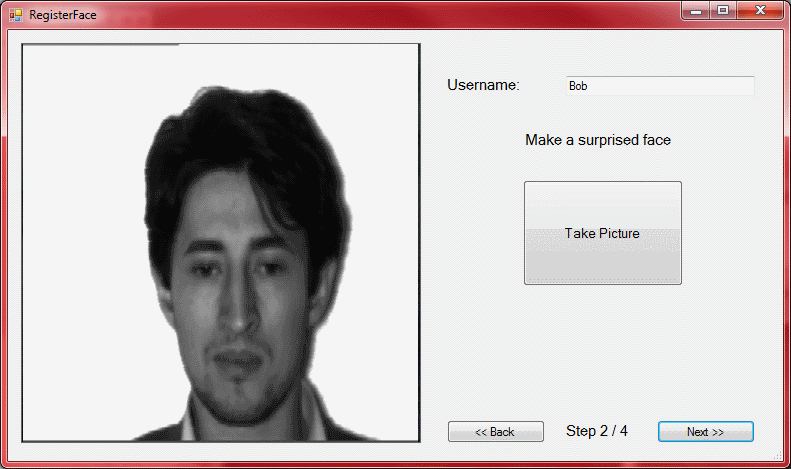
executable. Make sure you have a camera plugged in, or you will get an error. Once the system has started(it may take a couple seconds to start) the user can see if they are being detected as a face. It will probably think they are not a face seeing as how the background will most likely be different from the background used in the training set. The user will need to register themselves with the system to get recognized or get good results for face detection. The registration begins by pressing the "Register Face" button. Follow the instructions, successful registration will be indicated with a popup at the end that says "Registration was successful". The system should now be able to detect and recognize the user’s face. Please note that the application is connecting to a database, and therefore will need internet connectivity to register and access the training set. |
| Images |
|